
How to Check Trademark Status in India — Complete 2026 Guide
Posted on March 26, 2026 by Nitin Rawat

So you filed your trademark application. You got your application number. And now you are just sitting there, wondering — what is happening? Is my brand safe? Is someone going to steal my name?
We totally get that feeling.
The good news? You can check trademark status online right now — for free — in just 4 easy steps. No lawyer needed. No office visit required.
This guide will show you exactly how to do it. And we will also explain what every single status on the IP India portal actually means — in plain, simple English that anyone can understand.
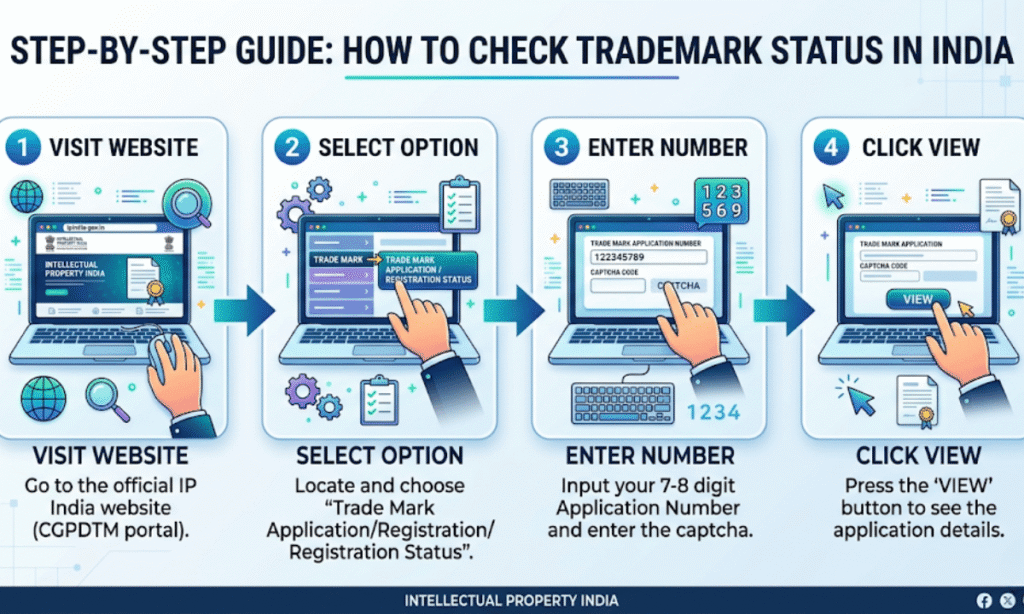
Quick Answer — How to Check Trademark Status (30 Seconds)
Step 1: Go to tmrsearch.ipindia.gov.in
Step 2: Click on “Trade Mark Application / Registered Mark”
Step 3: Enter your application number + captcha
Step 4: Click View — your status shows on screen
What is in This Guide?
Jump to any section you need:
- What is Trademark Status? — And why it matters so much
- The Official Way to Check Trademark Status — 4 steps, with screenshots guide
- Every Trademark Status Explained — From New Application to Registered
- The Status You Must NEVER Ignore — Act immediately or lose your brand
- How Often Should You Check Your Status?
- What to Do If Your Status Shows Objected or Abandoned
- FAQs — Most asked questions answered
Section 1: What is Trademark Status? (And Why Does It Matter?)
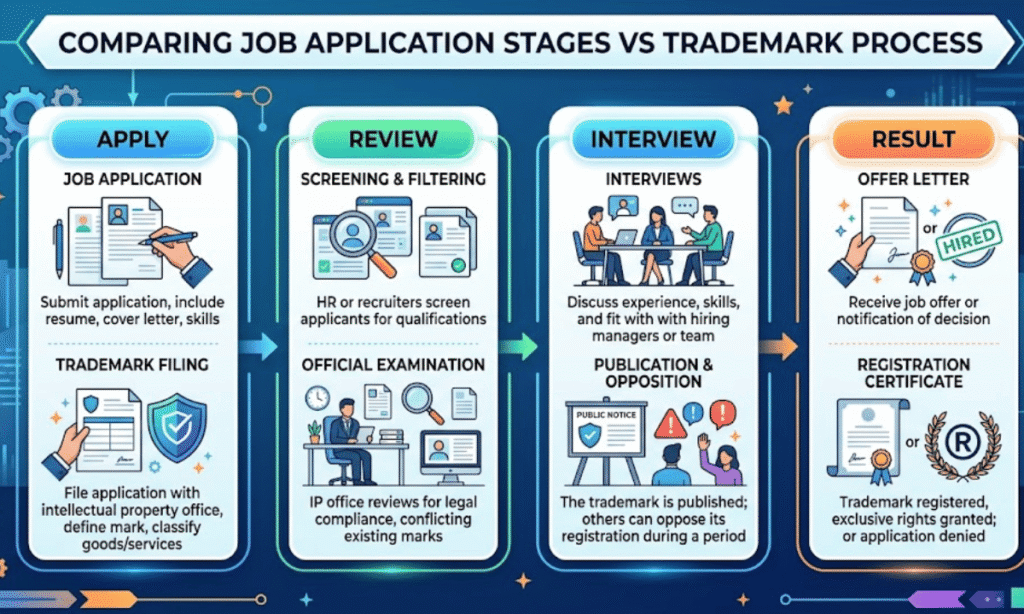
Think of trademark registration like a job application.
You send your application. Then it goes through many steps — review, background check, interview, waiting. At each step, your application has a different “status”.
Trademark status is the same thing. It tells you exactly where your application is right now — in the IP India (Intellectual Property India) system.
Here is why you should care a lot about your trademark status:
- Some statuses need your action within 30 days. If you miss it, your application gets cancelled.
- Some statuses mean your trademark is almost registered. Just wait.
- Some statuses mean someone is trying to block your brand. You need to fight back fast.
- Some statuses mean everything is going great. Relax.
Knowing your status helps you protect your brand name at every step.
| Expert Insight from Digifiling: In our experience handling 500+ trademark applications, the most common reason a trademark gets abandoned is not a legal problem — it is the applicant not checking their status for weeks and missing an objection deadline. Set a reminder. Check every 2 weeks. |
Section 2: How to Check Trademark Status in India — 4 Easy Steps
This is the official, free method. You do not need to pay anyone to check trademark status. It is always free on the government portal.
Step 1 — Go to the Official IP India Portal
Open your browser. Go to: tmrsearch.ipindia.gov.in
Make sure the website ends in .gov.in. That is the official government website. There are many fake websites that look similar — avoid them.
| Safety Tip: Always use the .gov.in domain. Never enter your personal details on any other trademark check website. |
Step 2 — Select the Right Search Option
On the left side of the page, you will see two options. Click on:
| “Trade Mark Application / Registered Mark” |
Then click on: National IRDI Number
Step 3 — Enter Your Application Number
You should have received your Trademark Application Number when you filed Form TM-A. It looks like this: 1234567 (7 digits).
Enter this number in the search box. Then type the captcha code correctly.
| Don’t have your application number? No problem. On the same portal, you can also search by your brand name or company name. Just select “Wordmark” or “Proprietor Name” in the search type dropdown. |
Step 4 — Click View and Read Your Status
Click the blue “View” button. The system will show your trademark details on screen.
Look at the top left corner of the result. You will see your current status written there. It will say something like:
- New Application
- Marked for Exam
- Objected
- Accepted and Advertised
- Registered
And many more. In the next section, we explain every single one of them.
Section 3: Every Trademark Status in India — Meanings & What to Do
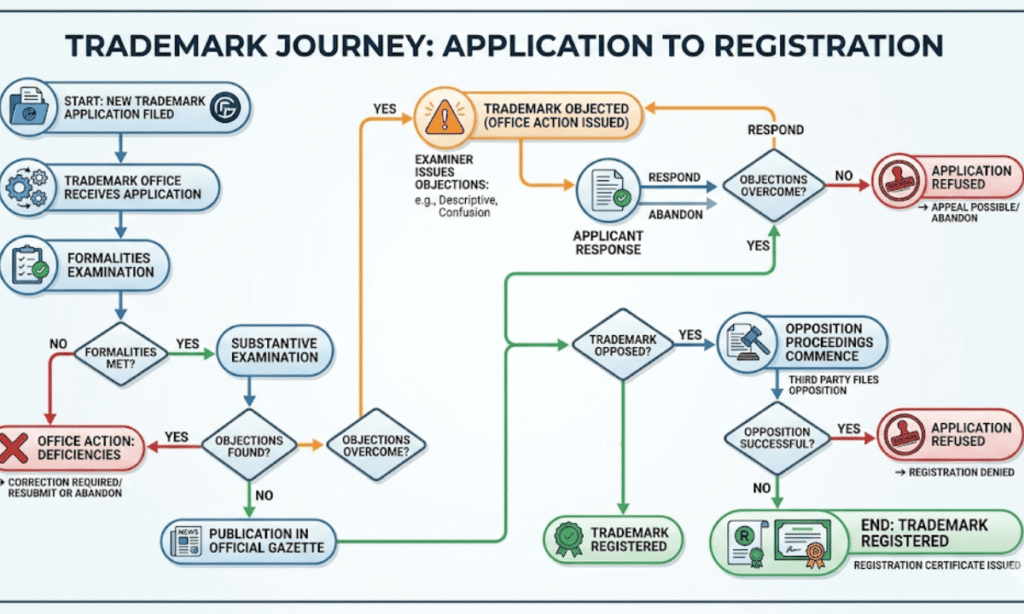
This is the most important section of this guide. Here we explain every status you will ever see when you check trademark status on IP India.
We have also added a colour-coded urgency column so you know instantly whether you need to act or just wait.
| Status | What it Means | What YOU Must Do | Urgency |
| New Application | Your application is received. It is in the system now. | Nothing. Just wait. | 🟢 Safe |
| Formalities Check Pass | Your documents and fees are all correct. Basic check is done. | Nothing. Just wait. | 🟢 Safe |
| Send to Vienna Codification | Your logo is being classified under an international system (for image marks). | Nothing. This is an internal admin step. | 🟢 Safe |
| Marked for Exam | A trademark examiner has been assigned to review your application. | Nothing. But check status every 10 days now — exam report can come anytime. | 🟡 Monitor |
| Exam Report Issued | Examiner has done the review and a report is ready — either accepted or objected. | Log in to the e-filing portal and read the report immediately. | 🟡 Monitor |
| Objected | The examiner has raised concerns. Your application has problems that must be fixed. | You MUST reply within 30 days. Do not ignore this. Hire a trademark expert. | 🔴 Act Now |
| Ready for Show Cause Hearing | Your reply to the objection was not enough. A hearing is now scheduled. | Attend the hearing on the date given. If you miss it, application can be refused. | 🔴 Act Now |
| Hearing | A hearing has been officially scheduled. Officer wants to hear your arguments. | Appear on the date. Bring all evidence of your brand’s use. | 🔴 Act Now |
| Accepted | Examiner is happy. No objections. Your mark will be published in the journal soon. | Nothing needed. But keep checking — status will change to Accepted and Advertised. | 🟢 Safe |
| Accepted and Advertised | Your trademark is published in the Trade Marks Journal. Now anyone can see it. | Watch for opposition for 4 months. If no one objects — you are almost registered! | 🟡 Monitor |
| Advertised Before Accepted | Mark published in journal before final acceptance — less common. | Watch for opposition for 4 months. Similar to above. | 🟡 Monitor |
| Opposed | Someone has filed a legal objection to your trademark in the 4-month window. | File a counter-statement within 2 months. Get a trademark lawyer immediately. | 🔴 Act Now |
| Registered | Congratulations! Your trademark is fully registered. You now have legal protection. | Download your Trademark Certificate from IP India. Use the R symbol. | 🟢 Safe |
| Abandoned | Application is dead. You missed a deadline and did not respond to an exam report. | You can try to restore it within 30 days under Section 25. Act very fast. | 🔴 Act Now |
| Refused | Examiner has officially rejected your application after examination and hearing. | File an appeal with IPAB within 3 months. Get a lawyer immediately. | 🔴 Act Now |
| Removed | Your registered trademark was removed — usually because you did not renew it. | File for restoration before the deadline. Contact Digifiling.in now. | 🔴 Act Now |
| Withdrawn | You (the applicant) withdrew the application yourself. | You need to re-file a fresh application if you still want the trademark. | 🟡 Monitor |

Section 4: The 3 Trademark Statuses You Must NEVER Ignore
Out of all the statuses above, these three are the most dangerous. Miss these and you could lose your brand forever.
1. Objected — Reply in 30 Days or Your Application Dies
When you check trademark status and see “Objected” — stop everything and act immediately.
The examiner has raised concerns. This usually happens because:
- Your brand name is too similar to another registered trademark
- Your name is too generic (like naming your company just “Best Shoes”)
- You are missing some required documents
- The examiner thinks your brand can confuse customers
You have only 30 days to reply. If you do not reply, the status changes to Abandoned.
| What to do: 1. Log into IP India e-filing portal and download the examination report 2. Read each objection carefully 3. Write a detailed reply addressing each point — with evidence 4. Submit through e-filing portal within 30 days |
2. Opposed — Someone is Challenging Your Brand
This is serious. Someone — usually a competitor — has decided to fight your trademark.
When status shows “Opposed”, you have exactly 2 months to file a counter-statement. If you do not, the registry may decide against you automatically.
Opposition happens mostly because your mark is similar to theirs. You will need to show evidence that your brand existed before theirs.
3. Abandoned — Not the End (If You Act Fast)
Seeing “Abandoned” feels terrible. But do not panic just yet.
You have a 30-day window to file a restoration request. After 30 days, the application is permanently gone and you have to start all over again.
Section 5: How Often Should You Check Your Trademark Status?
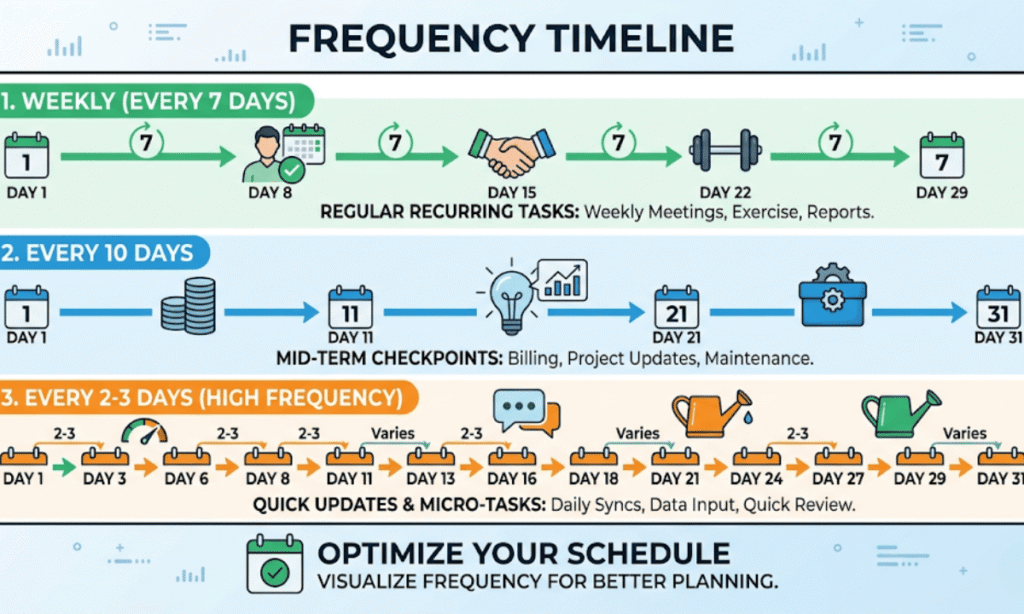
Here is a simple schedule based on where you are in the process:
| Stage | How Often to Check | Why |
| Just filed (New Application) | Once a week | Status changes fast in first 4–6 weeks |
| Marked for Exam | Every 10 days | Exam report can arrive any time |
| Objected / Hearing | Every 2–3 days | Deadline pressure — must act fast |
| Accepted and Advertised | Once in 2 weeks | Watching for opposition (4 months) |
| Registered | Every 6 months | Check renewal date — valid for 10 years |
Section 6: Can I Use the TM Symbol Before Registration?
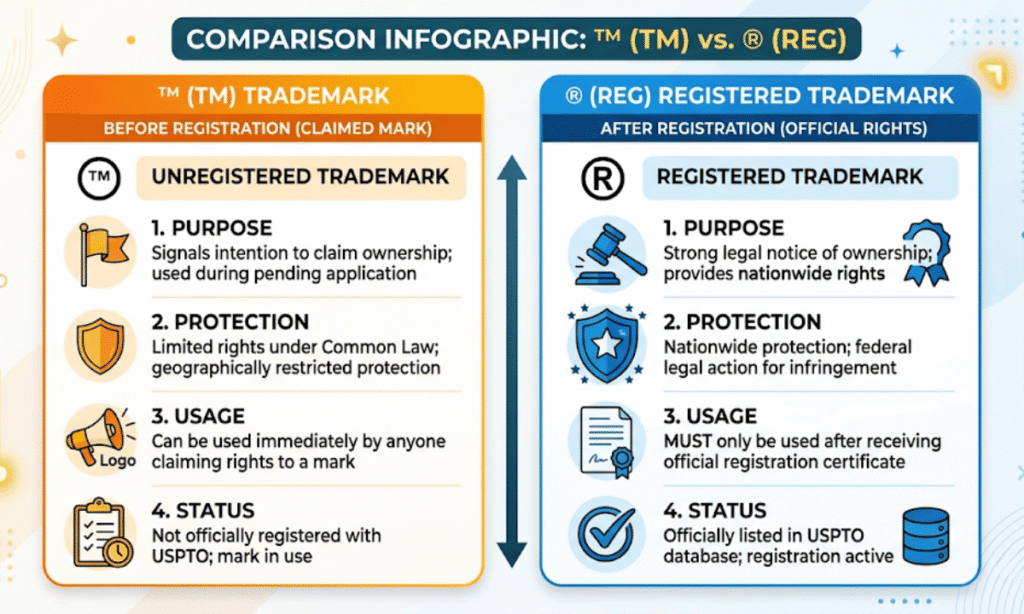
Yes! Here is a simple rule that most people do not know:
| TM Symbol (Trademark) You can use TM after filing your application. It says: “I have claimed this brand.” It does NOT mean full legal protection yet. Use it as soon as you get your application number. | R Symbol (Registered Trademark) You can ONLY use R after your trademark is REGISTERED. Using R before registration is illegal in India. Wait for your certificate from IP India. Then use the R symbol proudly. |
Why Trust This Guide?
We at Digifiling have helped over 500 businesses register their trademarks in India. Here is what makes this guide different:
| Experience: We have handled applications at every stage — from fresh filings to Opposed marks won at hearings. This is not theory. It is real experience. Expertise: Our team includes trademark specialists who understand the Trade Marks Act 1999 and IP India portal inside out. Authoritativeness: All information in this guide is sourced from the official IP India portal (ipindia.gov.in) and the Trade Marks Act. We link only to government sources. Trustworthiness: We tell you when things are complicated. We recommend getting a lawyer for Objection replies and Opposition cases. We do not over-promise. |
Need Help With Your Trademark? Digifiling Can Help
Checking your trademark status is free and easy. But what comes AFTER that — replying to objections, handling oppositions, responding to hearings — that is where most people get stuck.
Digifiling helps you with:
- Trademark Registration — from scratch to certificate
- Replying to Trademark Objections — expert-drafted replies
- Handling Trademark Opposition cases
- Trademark Renewal — so your brand never expires
- MSME Trademark Registration — at 50% government fee discount
| Get Your Trademark Registered with Digifiling Fast | Affordable | 100% Online | Expert Support Visit: digifiling.in/trademark-registration Call: +91 70113-96724 | Email: info@digifiling.in |
Frequently Asked Questions (FAQs)
These are the most common questions people ask when they want to check trademark status in India. We have answered all of them in simple language.
Q1. How do I check trademark status in India?
Go to tmrsearch.ipindia.gov.in. Click “Trade Mark Application / Registered Mark”. Enter your 7-digit application number and the captcha. Click View. Your current trademark status will show on the screen. It is completely free.
Q2. What does ‘Objected’ mean in trademark status?
It means the trademark examiner has found a problem with your application. You must reply to this objection within 30 days. If you do not reply in time, your application will be marked as Abandoned and you will lose your chance to register the trademark.
Common reasons for objection: your brand name is too similar to an existing trademark, your name is too common, or your documents have errors.
Q3. How long does trademark registration take in India?
In a smooth case with no objections, it takes about 12 to 18 months from filing to getting your registration certificate. Some fast-track applications have been registered in 5 to 8 months.
If your application gets objected or opposed, it can take 2 to 3 years.
Q4. Is checking trademark status free?
Yes. Completely free. The official IP India portal (tmrsearch.ipindia.gov.in) is a government website. You do not need to pay anything to check trademark status. Be careful of websites that charge money for this check.
Q5. My trademark status shows ‘Send to Vienna Codification’ for months. Is that normal?
Yes, this is very common for trademark applications that have a logo or device mark (image). Vienna Codification is an international system for classifying image elements. It is an internal admin step by the Registry. You do not need to do anything. The application will move to the next stage automatically.
Q6. What happens after trademark status shows ‘Accepted and Advertised’?
Your trademark is published in the Trade Marks Journal. This starts a 4-month opposition window. Any person or company can file an opposition if they think your trademark conflicts with theirs.
If no one opposes in 4 months, your trademark will proceed to Registration and you will get your certificate.
Q7. Can I check someone else’s trademark status?
Yes. The IP India portal is public. You can search any trademark by brand name, application number, or proprietor name. This is useful if you want to check if a brand name you like is already registered before you file your own application.
Q8. What is the difference between ‘Accepted’ and ‘Accepted and Advertised’?
“Accepted” means the examiner approved your mark but it has not been published in the journal yet.
“Accepted and Advertised” means your mark has been published in the Trade Marks Journal and is now open for public opposition.
Both are good statuses. Accepted and Advertised is one step closer to registration.
Q9. What should I do if my trademark status shows ‘Refused’?
A ‘Refused’ status means the examiner has officially rejected your application. You have two options:
- File an appeal with the Intellectual Property Appellate Board (IPAB) within 3 months
- File a fresh application with a different or modified trademark
Both options need expert legal help. Contact Digifiling or a trademark attorney as soon as you see this status.
Q10. I see ‘Removed’ status on my registered trademark. What happened?
A registered trademark is valid for 10 years. If you did not renew it before the expiry date, the Registry removes it from the register.
You can apply for restoration within 6 months of removal. After that, the trademark is permanently gone and anyone can file a fresh application for the same name.

Final Thoughts — Keep Watching, Keep Protecting
Your trademark is your brand’s identity. It is the name people know you by. It is what makes you, you.
That is why knowing how to check trademark status regularly is not just a good idea — it is something every business owner must do.
It takes 30 seconds. It is free. And it can save your brand from being lost forever.
If you ever see a status that worries you — Objected, Opposed, Abandoned, Refused — do not try to handle it alone. Reach out to a trademark expert. That one phone call can save months of work and thousands of rupees.
| Quick Recap: To check trademark status: Go to tmrsearch.ipindia.gov.in → Enter application number → Click View Statuses that need action: Objected (30 days), Opposed (2 months), Abandoned (30 days) Need help? Visit digifiling.in/trademark-registration or call +91 70113-96724 |